Family Mobile Support

  • Subscribe to our RSS feed.
  • Twitter
  • StumbleUpon
  • Reddit
  • Facebook
  • Digg

Thursday, 4 October 2012

Web fonts: a look under the hood

Posted on 14:41 by Unknown
Google Web Fonts are viewed more than 1 billion times every day across the web, on more than 100 million web pages. To help you sort through and pick the right font for your site you can order fonts by popularity, and now you can check out usage data for each font too.

Click on "Analytics" in the upper right corner of the homepage to view the new analytics tab, where you can see and compare numbers for individual font views by browser, operating system and see usage trends.


You’ll see a list of fonts, ranked by the total number of all-time font views and sortable by time period. To see a graph of font data for an individual font or a set of fonts, check the box next to the font name and click on the Trend button.


Clicking the views by platform tab on the left pane shows you a heatmap and pie charts of usage of each font by browser or operating system.


While browsing through fonts in the directory, you can also access analytics for an individual font at anytime by navigating to the Statistics tab on the font’s specimen page.


And finally, to help you compare and select fonts, clicking on the “Pairings” tab on the Specimen page will show you groupings of fonts that are frequently used together, based on actual usage data via the API.


Selecting the right font for your website is an expression of your personal style, and we hope to continue expanding the set of tools to help you do that. Happy browsing!

Posted by Raziel Alvarez, Software Engineer
Read More
Posted in | No comments

Monday, 24 September 2012

More places to get great fonts

Posted on 10:16 by Unknown
Open source fonts are good for the web: they’ve helped spur web font adoption, and made it easier for anyone to contribute improvements to fonts for the whole web community.

Today, we’re happy to announce that all the fonts in the Google Web Fonts directory are also available via Adobe’s new Edge Web Fonts service.

And on the heels of the recent release of Source Sans Pro, another Adobe designed open source font, Source Code Pro, is available today from both Google Web Fonts and Edge Web Fonts.

We’re also working with the Adobe team to hint some of the fonts in the collection, a process that will make them look better at smaller text sizes.

Here’s to a more accessible, translatable, and beautiful web!

Posted by Ajay Surie, Product Manager
Read More
Posted in adobe, new fonts, web fonts | No comments

Thursday, 9 August 2012

Preview fonts with the new Poster mode

Posted on 12:54 by Unknown
Selecting just the right font for your website or application is a personal decision, and making sure the font harmonizes with your content is often time consuming. To help you narrow down your font choices, last week we announced a new tool to compare individual characters in a pair of fonts side by side. Today, we’re introducing Poster Images, which allows you to easily see what a font looks like with different effects, on a variety of different backgrounds.

To start, visit the Google Web Fonts directory and select the Poster tab at the top.


Change the font size or the appearance of the poster to check out how different styles look. When you find a font you like, hover over it to see more details and add it to your collection.


We hope this makes choosing the right font easier and more fun!

Posted by Sang Tian, Software Engineering Intern
Read More
Posted in web fonts | No comments

Thursday, 2 August 2012

New Fonts, Early Access, and More

Posted on 11:13 by Unknown
Over the last few months, we’ve been busy adding support for web fonts to Google documents and Google presentations. Today, we’re adding seven font families in Google Web Fonts, a new tool to compare similar fonts, and an early access program to get feedback on non-latin scripts in development.

When you choose a new font, you want it to look good for all your readers, regardless of the platform or browser they’re using. To help make fonts look better in more places, we’re starting to hint more families in Google Web Fonts, thanks to the ttfautohint project, which automates this process. Amarante, Capriola, Courgette, and Quando were hinted using this tool.

Eagle Lake expands on our existing collection of calligraphic font styles, and you can use Metal Mania to bring out your inner guitarist. We’re also very excited to be including a special contribution from our friends over at Adobe - Source Sans Pro, their first open source type family.

As the number of fonts in Google Web Fonts continues to grow, it’s becoming harder to select the right font from among many potential choices. To make this process easier, you can now easily compare two fonts side by side using the new comparison tool. Just add a few fonts to your collection, select Review, and click on the Compare tab at the top.


You can then overlay glyphs from each font on top of each other, and use the slider to transition between fonts to see the differences between them more clearly.

Non-latin fonts can be more complex than latin fonts, both as designs and as font software, which often require more time to develop and polish. The designers of these fonts may not be native readers, and we’re hoping for your feedback to help them understand where their fonts need improvement. You can try them out by downloading them from the Google Web Fonts early access page.

Posted by Ajay Surie, Product Manager
Read More
Posted in new fonts, web fonts | No comments

Wednesday, 1 August 2012

450+ new ways to make your Google presentations pop

Posted on 10:22 by Unknown
(Cross-posted from the Google Drive blog)

Good design is an important part of getting your point across in a presentation. Over time we’ve added a bunch of features to help you bring a little something extra to your decks, like slide transitions and animations, thousands of free stock photos, and a growing collection of templates.

Today, creating eye-catching presentations gets even easier, with more than 450 new fonts to choose from. (flip through the presentation below to see them in action)


To browse and select new fonts, click on Add fonts from the bottom of the fonts dropdown in the toolbar. This will take you to the menu of all available fonts, where you can pick the ones you want to use.


Any fonts that you select will get automatically added to your fonts list so it’s easy to find them later.


Plus, fonts that you’ve already added to Google documents will automatically appear in your presentations font list too.

So next time you're working on a presentation, jazz it up with some Calligrafitti, Indie Flower, Short Stack, or hundreds of other new choices.

Posted by Erin Rosenbaum, Software Engineer
Read More
Posted in | No comments

Wednesday, 2 May 2012

Google documents, now with web fonts!

Posted on 11:12 by Unknown
(Cross-posted from the Google Docs Blog)

In the past month we’ve made updates both big and small to Google Docs, and today we’re announcing one more: web fonts in Google documents. Often the best way to get your point across is to present your idea in a creative, captivating way. Today, we added over 450 new fonts to Google documents to make it easier for you to add a little something extra to whatever you create.

To use these new fonts, click on the font menu and select “Add fonts” at the very bottom, which will take you to a menu of all the Google Web Fonts available.


Once you’ve selected new fonts, you’ll be able to select them from the font menu.


Whether you’re looking for the perfect font for your first comic book or fancy handwriting for your wedding invitations, we hope you try out the new fonts and create some eye-catching documents.

In addition to hundreds of new fonts, we have a lot of other exciting updates to report:
  • Google Drive launched as a place where you can create, share, collaborate, and keep all your stuff. 
  • There are now a few more options for inserting images in Docs, including inserting from Google Drive, searching for images from the LIFE Photo archive, or taking a snapshot with your webcam. 
  • Charts in spreadsheets now has support for minor gridlines and options to customize the formats of axis labels 
  • Accessibility in Docs got better with support for screenreaders in presentations and with the addition of NVDA to our list of supported screenreaders. 
  • From File > Page setup... you can now set the default page size for your new documents. 
  • It's now easier for speakers of right-to-left languages by automatically showing bidirectional controls when you type in a language that might use them. 
  • Apps Script had many improvements, including 
    • A new ScriptService for programmatically publishing your scripts and controlling when they run. 
    • A new function to find the root folder of someone’s Drive. 
    • An increase in the allowed attachment size in emails from 5MB to 25MB. 
    • An increase in the size of docs files you can create from 2MB to 50MB. 
  • There are now over 60 new templates in our template gallery.
Posted by Isabella Ip, Software Engineer
    Read More
    Posted in google documents, web fonts | No comments

    Friday, 6 April 2012

    ttfautohint reaches its $30,000 funding target!

    Posted on 16:02 by Unknown
    The Google Web Fonts team would like to congratulate Werner Lemberg on reaching his $30,000 funding target for ttfautohint.

    Here is a fun video that explains what the project is about:


    As a true open source project, it has sought contributions from across the industry. Google Web Fonts, FontLab and many individuals have given the project financial support. This week the Extensis WebINK team announced they have enabled Werner to reach his goal:

    blog.webink.com/webink/extensis-webink-funds-open-source-ttfautohint-better-fonts-on-screen

    You can download a graphical user interface for GNU/Linux and Windows today, a command line tool for Mac OS X, and of course the source code, from the project homepage:

    www.freetype.org/ttfautohint

    Posted by Dave Crossland, Font Consultant, Google Web Fonts Team
    Read More
    Posted in | No comments

    Friday, 30 March 2012

    Congratulations to All Designers of Tipos Latinos 2012!

    Posted on 21:56 by Unknown
    ¡Felicitaciones a todos los diseñadores de Tipos Latinos 2012!

    The Google Web Fonts team would like to extend our congratulations to all designers selected for the Tipos Latinos 2012 Biennial.

    El equipo de Google Web Fonts felicita a todos los diseñadores seleccionados en la Bienal Tipos Latinos 2012.

    We were looking forward to seeing the results of this prestigious review of work by typeface designers across Latin America because we have been working with many of them.

    Tenemos muchas ganas de ver los resultados de este prestigioso evento de diseño tipográfico de Latinoamérica, porque nosotros estuvimos trabajando con muchos de ellos.

    Around a quarter of the typefaces featured are available in Google Web Fonts today – or very soon:

    Aproximadamente un cuarto de las tipografías seleccionadas ya están disponibles en Google Web Fonts o lo estarán muy pronto:


    • Buenard, by Gustavo J. Ibarra (Argentina)

    • Petrona, by Ringo Romei (Argentina)

    • Ruluko, by A. Sanfelippo, A. Díaz y M. Hernández (Argentina, Colombia, Colombia)

    • Unna, by Jorge de Buen (Mexico)

    • Acme, by Juan Pablo del Peral (Argentina)

    • Macondo, by John Vargas Beltrán (Colombia)

    • Rufina, by Martín Sommaruga (Uruguay)

    • Abril, by José Scaglione y Veronika Burian (Argentina)

    • Alegreya, by Juan Pablo del Peral (Argentina)

    • Almendra, by Ana Sanfelippo (Argentina)

    • Andada, by Carolina Giovagnoli (Argentina)

    • Bitter, by Sol Matas (Argentina)

    • Delius, by Natalia Raices (Argentina)

    • Rosarivo, by Pablo Ugerman (Argentina)


    The Alegreya family (including its Small Caps sister family) received a "Mención de Excelencia" (Recognition of Excellence) – congratulations Juan Pablo!

    La familia Alegreya (que incluye una familia Small Caps) recibió la única "Mención de Excelencia" que en esta edición entregó el Jurado. ¡Felicitaciones, Juan Pablo!

    You can read more about Tipos Latinos at tiposlatinos.com.

    Pueden ver más sobre Tipos Latinos en tiposlatinos.com.


    Posted by Dave Crossland, Font Consultant, Google Web Fonts

    Publicado por Dave Crossland, Consultor tipográfico, Google Web Fonts
    Read More
    Posted in | No comments

    Tuesday, 7 February 2012

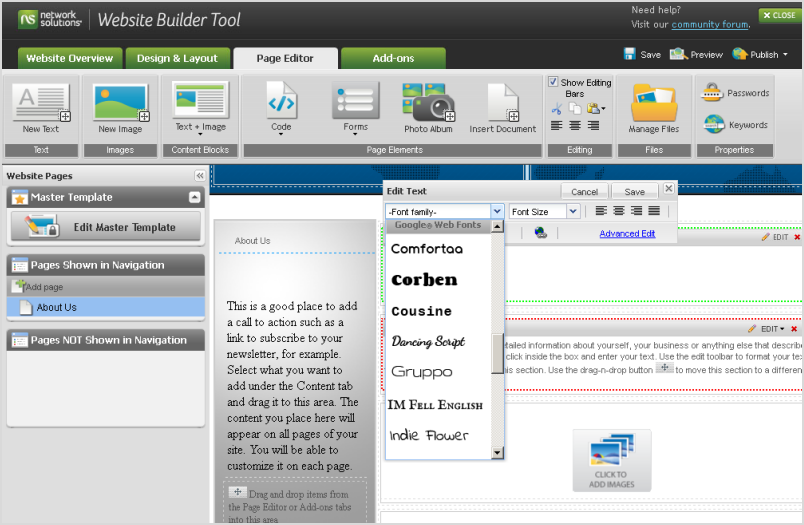
    Google Web Fonts is integrated into Network Solutions’ Website Builder Tool

    Posted on 09:24 by Unknown
    The Google Web Fonts team is proud to announce that Network Solutions have integrated our service with their Website Builder Tool.

    Network Solutions is one of the largest domain registrars. When you register a domain with them, you can quickly and easily create a website using the Website Builder Tool. In the Page Editor, you can simply select a font from a drop down list in the typography palette for any text area:


    Get a domain from Network Solutions, create your site and you’re good to go with web typography!

    Read more at the Network Solutions blog.

    Are you a web developer, looking to present our growing collection to your users? If so, you should definitely check out the Google Web Fonts Developer API, which allows convenient programmatic access to a list of all fonts in the directory.

    Posted by Dave Crossland, Font Consultant, Google Web Fonts
    Read More
    Posted in | No comments

    Monday, 9 January 2012

    Web Fonts, now more compressed

    Posted on 11:55 by Unknown
    One of Google’s core principles is that "fast is better than slow", and the Web Fonts team takes that to heart. We’re always looking for ways to make web fonts load faster, and that’s doubtless a key factor in our rapid user adoption. Today, we are announcing a new way to make web fonts smaller and faster, in collaboration with the Monotype Imaging Fonts.com Web Fonts team. Google Web Fonts now implements Monotype Imaging’s MicroType Express compression format, which yields an approximate 15% savings in file size over using gzip alone. This change will automatically speed up Google Web Fonts for Internet Explorer browsers (version 6 and up). We’re also actively working to offer improved compression with other modern browsers, including Google Chrome.

    We’ve kept the interface simple, so designers don’t need to update their integrations in any way — we’ll automatically upgrade the CSS snippet and font files so that site designers and visitors get their fonts faster. We’ve done this for previous speed optimizations as well, such as automatically stripping the hints (metadata used for improving rendering quality on Windows) when serving fonts to Mac, iOS, and Android clients. We expect that most future optimizations will also be automatic and transparent.

    Monotype Imaging has agreed to make MicroType Express available to the public at no cost; the license can be found at monotypeimaging.com/aboutus/mtx-license. We believe it’s friendly to both open source and proprietary implementations.

    Today, we are also releasing an implementation of MicroType Express compression as part of the Embedded OpenType converter in the open-source sfntly library, adding to the existing WOFF compression. The sfntly library, developed by the Google Internationalization Engineering team, serves as the core conversion engine in Google Web Fonts for subsetting, hint stripping, and related functions of our dynamic serving path. We hope that all web font services, as well as people hosting their own web fonts, will use sfntly to optimize font serving across the web.

    We are proud to be working with Monotype Imaging, and we look forward to learning more from designers, users, sites and other partners to advance the state of web fonts together!

    Posted by Raph Levien, Engineer, Google Web Fonts
    Read More
    Posted in | No comments
    Newer Posts Older Posts Home
    Subscribe to: Comments (Atom)

    Popular Posts

    • Navigate the font directory more easily and submit your fonts
      To make it easier for you to navigate all the tools and documentation that are part of the Font API we have created a unified navigation for...
    • Introducing the Ubuntu Font Family to the web
      Google and the Ubuntu project have today released the Ubuntu Font Family to the world through the Google Font Directory. The new Ubuntu Fon...
    • New Fonts for the New Year
      The Google Font team is excited to announce the addition of a handful of high-quality web fonts for you to use freely on your website or blo...
    • Web fonts go mobile
      Google Fonts now work for the vast majority of mobile devices, including Android 2.2+ devices, iPhone and iPad! And now with the recent rel...
    • A more fontastic Google Docs
      (Cross-posted from the Official Google Blog and the Google Docs Blog ) Documents without font choices are like photographs without colors. ...
    • Interview with Astigmatic
      We recently got a hold of Brian Bonislawsky, founder of the Astigmatic One Eye Typographic Institute , to describe his design process and mo...
    • Optimizing the use of the Google Font API
      At Google, we're absolutely obsessed with making the web faster, and delivering the lowest possible latency to users. Naturally, with th...
    • New! Web Font Statistics
      We're excited to announce the launch of two new features of the Google Font Directory . 1) Font level statistics Curious to see which fo...
    • International Fonts Launch Today
      Today is a big day for the Google Font API. We have officially added our first non-Latin fonts to the Google Font API and Google Font Direc...
    • Google documents, now with web fonts!
      (Cross-posted from the Google Docs Blog ) In the past month we’ve made updates both big and small to Google Docs, and today we’re announcing...

    Categories

    • adobe
    • google documents
    • google fonts
    • halloween
    • interview
    • kickstarter
    • monotype
    • new fonts
    • ofl
    • omnibus type
    • rosario
    • typekit
    • ubuntu
    • web fonts

    Blog Archive

    • ►  2013 (3)
      • ►  May (1)
      • ►  April (2)
    • ▼  2012 (10)
      • ▼  October (1)
        • Web fonts: a look under the hood
      • ►  September (1)
        • More places to get great fonts
      • ►  August (3)
        • Preview fonts with the new Poster mode
        • New Fonts, Early Access, and More
        • 450+ new ways to make your Google presentations pop
      • ►  May (1)
        • Google documents, now with web fonts!
      • ►  April (1)
        • ttfautohint reaches its $30,000 funding target!
      • ►  March (1)
        • Congratulations to All Designers of Tipos Latinos ...
      • ►  February (1)
        • Google Web Fonts is integrated into Network Soluti...
      • ►  January (1)
        • Web Fonts, now more compressed
    • ►  2011 (13)
      • ►  November (2)
      • ►  October (2)
      • ►  September (1)
      • ►  July (1)
      • ►  June (2)
      • ►  April (1)
      • ►  March (2)
      • ►  February (1)
      • ►  January (1)
    • ►  2010 (11)
      • ►  December (3)
      • ►  November (2)
      • ►  October (2)
      • ►  September (3)
      • ►  August (1)
    Powered by Blogger.

    About Me

    Unknown
    View my complete profile